Our "Scrappy" Friends!

Welcome!

Hello fellow scrapbookers!!! Welcome to "Lasting Memories" which is all about LAYOUTS!! Yes, JUST layouts! There are no cards allowed here. We have weekly themed challenges, but you have the whole month to get in on the fun! Our challenges begin each Sunday at 8am EST and all 4 challenges will end on the date listed on the sidebar at 6pm EST. At month's end, we will choose a GDT to join us for a month! Only one entry per challenge, and no back-linking is allowed since we would love to know that we "challenged" you. We look forward to challenging you and helping you get your pages completed!

Specialized Hosting Sites

A lot of crafters use specialized hosting sites that not all of us have access to. We just wanted to let you know that if we don't comment, it's because we don't have access - but we see your work here at LM and appreciate your taking the time to link up and show off your style!!
Showing posts with label talented tuesday. Show all posts

Tuesday, May 13, 2014

Tuesday Featured Treats!!

Happy Tuesday everyone!!  A couple challenges going on here for the month of May so far.  The links are on the right sidebar.  Here are a few examples from our readers.  Fun!!  Come join us!  Can't wait to see your takes!  
Awesome prize up for grabs and Guest DT for June to be awarded!
Happy Scrappin'!!

CHERYL
From our "Create your Own Background" challenge
Masked circles and Using a Brayer!  Perfect!!  Cute idea for bubbles!!


From our "Use unusual Embellishments" challenge...
RITA
Rita created her own Envelope/Bag.  (Top Right)  Great idea!!

Thanks so much for stopping by and hope you find time to create with us this week!

Tuesday, February 14, 2012

Talented Tuesday - How to make Prima Roses by Michelle!!

Hello friends!!! We're a little late today, but believe me, this was well worth the wait! Michelle did an AMAZING video tutorial!! Check this out!!


So?? What do you think?? Be sure to let us know by leaving us a comment and Michelle would love to hear what you think!! Thanks for stopping by and see you soon with some reader's entries!!

Tuesday, January 31, 2012

Talented Tuesday - "Toothbrush Painting" by Haven

***You'll find a linky at the bottom, because we thought this was such a cool tutorial, we wanted to see what YOU do with it!!!***


Hello and welcome to my Tuesday Tutorial for Lasting Memories. Today I'm sharing the painting technique I used in this week’s "trash it" layout.  I kept my old worn out toothbrush to paint and splatter on my layout.  I started by drawing several circles on my card stock with brown ink, and then went over it with the toothbrush and yellow acrylic paint.


Warning this technique is messy so protect your work surface.


To get a fine splatter hold the toothbrush so that the bristles are up and drag your thumb across them from front to back as seen in the photos below


For larger splatter and drips turn the brush so that the bristles are facing down and repeat the above mentioned thumb drag.


For the larger splatter I used a mixture of yellow, white and black paint


And here's a close up of what it looks like before the photos are added!!


Thanks for stopping by!! Now it's your turn to try this yourself!!! If you have a chance to try it, link up here so we can have a peek!!!

Tuesday, January 24, 2012

"Talented Tuesday" - Cropping a Photo in My Memories digital software

Good morning friends and fellow scrappers! Karen here with another awesome digital tutorial!! You know I LOVE my My Memories Suite! So, when I was putting my layout together, when I loaded my photo up, it wasn't centered the way I wanted .. so here's how I fixed that!

Note the full face portrait isn't centered - I've clicked it and you can see it's got the squares around it

Now I've double clicked and this menu opens up where I can slide the 'window' around my photo to better center it 

I've got it the best I can do, so now I click ok 

Note the change in the final photo! It's that simple! 

If you find you're interested in trying this program, at the top of the page you'll see a banner with my code - just follow the instructions on the banner and save!!! Thanks for visiting us today and we hope you'll come by again!

Tuesday, January 17, 2012

"Talented Tuesday" - Keep That Trash!!!

Hi, Denise here with our second "Talented Tuesday" Ever hear that saying "one person's trash is another person's treasure"? Don't throw your trash away. I would like to show you another way to use your trash, by using your negative images. I'm going to make a stained glass frame using my Big Shot. It works kinda like a Cuttle Bug but it accepts thicker items (even fabric) This is the die cut I'm using (you don't have to use this die cut or even the Big Shot, you can use your cricut or...)


And here's the Big Shot. It has instructions to make your sandwich.

I cut out 4 lattice die cuts out of foil card stock.

Which means I had all these wonderful negative images Now just start replacing the spots with the negative image's.

At Christmas time you can make an ornament by putting 2 together and don't forget, you have these negative images too!

Make a fancy frame or put vellum behind it to make a true window.The possibilities are endless. You can even make a BANGLE BRACELET! LOL!!!

That's it for today!! Join us tmw for some challenge inspiration and in the meantime, check out our current challenge and don't forget, if you're looking for a fun sketch, check the right sidebar!! 

Tuesday, January 10, 2012

"Talented Tuesday" - Working With A Digital Software Program (lots of pics!)

Introducing a new element to Lasting Memories!! Every Tuesday, one of us from the DT will share either a scrapbooking tip, trick or tutorial with you!! You just never know what you'll learn each week!! Today we're starting off with Karen to show you how to do a page using digital software.

Hi all!! The digital software I use is "My Memories Suite". I have been using it for a few mths now and I absolutely love it. You can find TONS of freebies on their site as well as really awesome kits. You can also dl other kits right into My Memories Suite as well. So, let's get started!!!


First off, you'll start your layout. I always look and see how many pics I am wanting to use and then I choose my LO. For this one, I need 4 pics and I decided to use an already pre-made LO 


On the right of my work space is where I can choose all my backgrounds, embellishments etc as shown here


So, I want to add my background to match my photo's, so I add my photo's to my LO first - you can see the menu to the right opens up when you load in your pics. We'll talk about that in a minute .. for now, I've loaded my pics and now want to choose a background


Menu to the right, I've clicked on backgrounds and I'm going to choose something from my "Outdoors" file


I've clicked on the background I wanted and clicked "apply" and here we go!!


Now I want to add a shadow to my pics, so I click on one (doesn't matter which) and you'll see the menu to the right open again and you can see all your options. I clicked "Shadow" and you'll see the menu below where you adjust your settings to what you want, now where it asks Apply to all photo's: you choose .. I chose "On This Page"


And this is what it looks like!! Kind of gives it a 3D effect


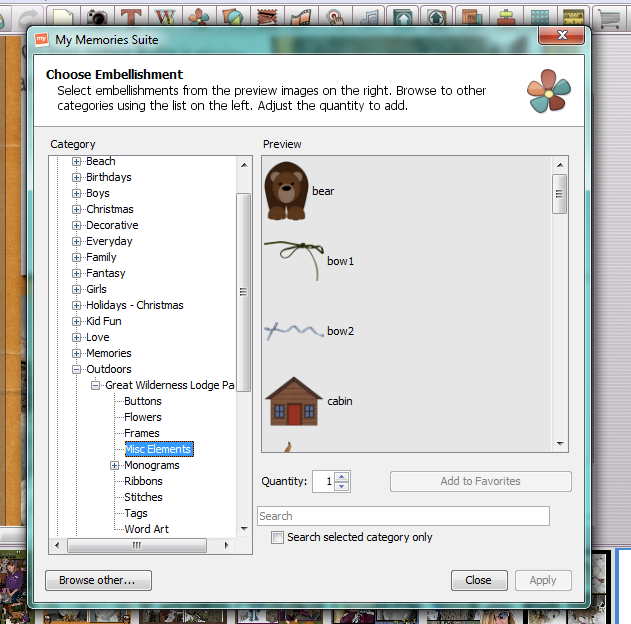
Now I want to add embellishments, so back to my control panel and choose "Embellishments"


Again, I chose my "Outdoors" Category and then into "Misc Elements"


Here you see I added a ribbon .. when you add your embellishments, they always come up on the middle of your page and then you move them where you want to


I also wanted to add "Nature" to my page - one thing about using digital, you can size everything to what you want!! I made mine a little bigger and left in the middle of my layout


Another thing with digital, which I LOVE, is that you can also add "Shadow" to your embellishments!! Click your embellishment, up pops your menu, adjust your settings and then click if you want it to apply to all on the page or in your whole album


This is my new settings .. look at "Nature" and you can see the difference


And here is my finished layout!!!!
These are 2 different cats - a bobcat and a lynx, aren't they just gorgeous???


I hope you enjoyed today's tutorial!! If you want to try your hand at this program, you can have a look at My Memories Suite and on the top of this page you'll see my code which you add at checkout and it saves you $10 off the program AND gives you $10 credit IN STORE!!

Happy Scrappin' and see you tomorrow with a Featured layout or 2!! Be sure to join us, you can find our current challenge right HERE!!


Related Posts with Thumbnails